#include <twwindow.h>
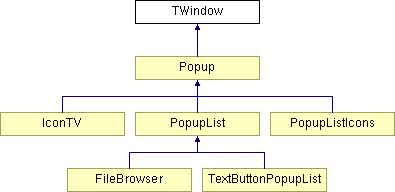
Inheritance diagram for TWindow:
Public Member Functions | |
| void | enable () |
| void | disable () |
| void | hide () |
| void | show () |
| TWindow (char *identbase, bool vidwin=false) | |
| void | setscreen (BITMAP *scr) |
| BITMAP * | bmp (char *bmpname, bool vidmem=false) |
| void | center_abs (int xcenter, int ycenter) |
| void | center (int xcenter, int ycenter) |
| void | center () |
| void | locate (int xtopleftcorner, int ytopleftcorner) |
| void | display (int idle_ms=0) |
| void | load_music (const char *filename) |
| void | load_sample (const char *filename) |
Public Attributes | |
| bool | use_rle |
| int | autoplace |
| TWindow * | prev |
| bool | disabled |
| bool | hidden |
| BITMAP * | mouse_bmp |
| TwguiMusicBase * | window_music |
| TwguiSampleBase * | button_sample |
Special navigation controls:
Special settings for each window:
|
||||||||||||
|
vidwin: places the bitmaps used by the menu in video-memory, which is faster. Identbase: a string, which serves as the base for buttons that are assigned to the window. Also, identbase*backgr.bmp should exist, which defines the window layout. |
|
||||||||||||
|
return a bmp from the data file |
|
|
centers the window on the middle of twscreen |
|
||||||||||||
|
centers the window on these pixel coordinates on the screen |
|
||||||||||||
|
centers the window on this position, with additional correction for screen resolution |
|
|
changes the "disabled" flag |
|
|
Calls the calculate and animate functions of the window, and then displays the menu on a vidscreen. Also uses an "idle" value (in milliseconds) after it's being displayed, for your convenience. This routine can be used in loops where you wait purely for user-input. |
|
|
changes the "disabled" flag Reimplemented in Popup. |
|
|
changes the "hidden" flag |
|
|
load music that will play when the window is active. |
|
|
load a sample that will sound when a button is pushed |
|
||||||||||||
|
locate the topleftcorner of the window, with addition correction for screen resolution |
|
|
set the screen to which the menu items are written |
|
|
changes the "hidden" flag |
|
|
The "autoplace" option in the info.txt file: true: then the auto-search is used to place a bitmap somewhere, and also there's always a check to see if this is needed; false: then the ini positions are used without further questions. |
|
|
make a sound if you hit a button |
|
|
disables the window (for calculation) |
|
|
hide is "stronger" than disabled, since it also prevents drawing. |
|
|
mouse bitmap associated with this window |
|
|
keeping track of a list of (related) windows |
|
|
(default=true): caches the background bitmap into an rle sprite, which is a compressed version of the bitmap. This can be very useful for simple backgrounds with large areas of the same color, but disadvantageous for complex bitmaps. If set to true, this creates a cached .rledat file next to the .bmp file, so you can check how much you save. Even if you don't save much, the rle operation is usually faster than the normal bitmap blitting. Set the "userle" option to "0" if you don't want to use it. You've to delete it manually if the .bmp is changed. |
|
|
play a piece of music, each time the window opens |
 1.4.6-NO